Aspects of creating a Turn-based game : Part 1 - The Camera Controller

Motivation
In the 2023 Game Awards, I was rooting hard for Insomniac's Spiderman 2 to win the Game Of The Year(GOTY), mainly because I'm a huge Spiderman nerd and have been a fan of the first game, but also because some of the most talented people I know in the industry, worked on this game(PS: I got a free copy, shoutout to my homie Jackson). So Baldur's Gate 3(BG3) winning the GOTY award was a shocker to me(it did win a lot of other awards too). The thing is, a lot of prominent voices in the industry, game streamers as well as the general audience seemed to had already predicted this win which was flabbergasting to me.
To be honest, I've never been a fan of the Dungeons and Dragons franchise, because for some reason, even for a nerd like me, it seemed way too nerdy. But even I cannot deny it's popularity. So I decided to give BG3 a fair shot begrudgingly and lo and behold, before I could sense it, I had already put some around 90 hours into it.... in just three weeks, averaging roughly 4-5 hours of gameplay daily which, for a casual third person action adventure player, is quite a huge amount. The point is, I actually enjoyed it quite a lot and I can now see why it won the GOTY.

Now to be fair, BG3 isn't my first turn based RPG game. That would be the Pokémon series and later the Civilization series in the strategy genre. I have also played Desperados 3 which is again a great game utilizing turn based concepts. So the aim of this post and other subsequent ones would be to analyze mechanics in turn based games, both in-terms of design and engineering, which makes them so fun to play with and attempt to replicate certain aspects of these games so as to extend some of these functionalities in certain different types of game settings. Ideally creating a Turn Based game mode for Unreal, like its third person mode, would be my end goal here

Design and Engineering Analysis
Turn based games always have some strategy and planning inherent to them, making you think while it's not your turn, on what would be the best move to do when it is finally your turn. One of the subtle tools which they provide you to help make that decision, is the camera. In some games you would not be allowed to move the camera out of the current combat context, while in some you would have complete control over the camera so that you can predict what would be an advantageous spot for you, or if any other enemies who have not spotted you yet, might join in the combat.
In games like BG3, you might have your characters to control, but I feel the real player component here is the camera, as the player is directly interacting with the camera through device inputs and not the actual characters unlike a third person mode. Hence the player controller here would only control the camera and the actual playable characters would be controlled by selecting their abilities(movement, combat etc.).
I am going to mix up things a bit here and instead of BG3, my reference for the camera movements is going to be from strategy games like Age of Empires and Anno series. There are only three types of controls which the camera can act upon:
1. Panning: Moving the camera in the cardinal directions only on the mouse reaching the respective boundaries
2. Rotating: Pitch and Yaw movements of the camera to observe the scene in different angles
3. Zooming: Moving the camera up and down along the zoom axis to observe the scene better
To get a better idea of how these axes would look like, here's a rough illustration made by me in the best software ever created..Paint3D

Here, I have added a Spring Arm component and attached the camera to the end of it for convenience of rotations and zooming with the camera. Lets quickly look at the mathematical implementations:
Rotation:
Pitch - We can simply just rotate about local Y axis of the camera.
Yaw - Rotate the Spring Arm about the global Z axis
Zoom:
Simply controlling the length of the Spring Arm will result in the zoom action
Panning:
This is done when the mouse reaches near the boundaries of the screen. Boundaries can be detected by the HUD by drawing appropriate sized Hitboxes and subscribing to their hover methods and moving the camera along respective forward or right axes.
Pan Forward Axis : Projection of Zoom axis on the XY plane
Pan Right Axis: Cross Product of the global Z axis and the Pan Forward Axis

To prevent panning while rotating and accidently hovering over the hitboxes, we can put a quick boolean check.
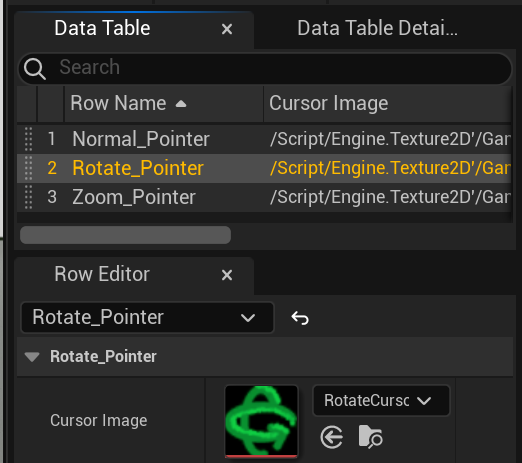
I am using a custom cursor widget, by which I can change the cursor image on any event simply by using a string and mapping it to the corresponding image in a Data Table, which can be used in the future, maybe to have a different cursor on different abilities. The artwork here btw is from yours truly again in the legendary software.. Paint 3D
With all this done and connected to the player controller blueprint, this is how the game looks like:

Have more such systems planned ahead and will post soon so stay subscribed :)


Comments